
Calendar for the apartmentE, villas, etc.
Calendar for apartments or Occupancy calendar is a useful functionality that owners of apartments, houses for rent and similar activities can manage on the site themselves. The occupancy calendar is done by the site owner himself to mark the days that are free or busy.
When implementing this system, we also send personalized video instructions on how to manage these terms.
Answers to questions you may be interested in.
How do I see which dates are available for booking?
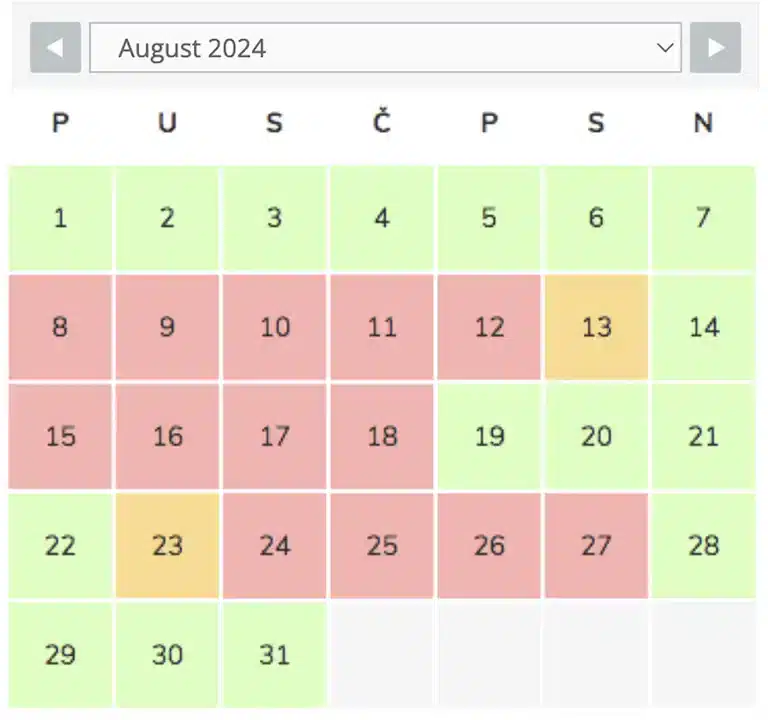
The calendar shows the days in different colors that indicate their status:
- Green: Available
- Red: Reserved
- Green/red: Day of change (e.g. day of arrival/departure)
Visitors simply browse the calendar and instantly see which dates are free to book. If the ‘tooltip’ option is enabled, they can keep the mouse pointer above the date to see additional information, such as notes or prices. This is extremely useful when you, as the owner of the apartment, want to give some additional information only for these days, e.g.: The apartment will be exceptionally free for new guests only at 6 pm.
Does the calendar update automatically when someone makes a reservation and whether the calendar is synchronized with Booking.com, Airbnb, etc.
- The idea of the calendar is that the owner of the apartment simply updates free and busy dates and in the basic version the calendar cannot be updated by the guest. However, the calendar can be adjusted to synchronize with these systems.
Is it possible to view multiple apartments in one view (overview)?
- Yes, it is possible to show multiple apartments in one view.
Can I change the colors of busy and free dates
- I can. Colors can be what you want. As a standard, green is used for free terms, and red is used for busy terms.
Is it a problem to change dates from free to busy
- The owner logs onto the page and literally adjusts the date he wants. But when we install the occupancy system, we send each owner short video instructions on how to use the system. It is mostly very easy to manage and is designed for people whose computers are not the primary activity.

 EN
EN  HR
HR  DE
DE